ReAct: Build Reasoning and Acting AI Agents with LangGraph
来源路径:
raw/04_文档与参考/Markdown文档/Build Reasoning and Acting AI Agents with LangGraph.md
TL;DR
这是一份90分钟的实践教程,指导开发者使用 LangGraph 框架基于 ReAct(推理+行动)范式构建可调用外部工具的AI智能体。教程从 ReAct 基础概念讲起,逐步完成依赖安装、工具开发、状态管理、手动推理循环演示,最终自动化构建出完整可运行的 ReAct 智能体,并配套练习帮助学习者拓展能力。
目录
- What is ReAct
- Objectives
- Setup & Installation
- Understanding Tools in ReAct
- Setting up the Language Model
- Key Takeaways
- Exercises
- Testing Your Solutions
- Authors
What is ReAct?
ReAct stands for Reasoning + Acting. It’s a framework that combines:
- Reasoning: The agent thinks through problems step by step, maintaining an internal dialogue about what it needs to do.
- Acting: The agent can use external tools (search engines, calculators, APIs) to gather information or perform actions.
- Observing: The agent processes the results from its actions and incorporates them into its reasoning.
This creates a powerful loop: Think → Act → Observe → Think → Act → …
Why ReAct Matters
Traditional language models are limited by their training data cutoff and can’t access real-time information. ReAct agents overcome this by:
- Accessing current information through web searches
- Performing calculations with specialized tools
- Breaking down complex problems into manageable steps
- Adapting their approach based on intermediate results
Objectives
After completing this lab you will be able to:
- Use the ReAct framework to solve multi-step problems with external tools
- Teach an AI agent to reason step by step, take actions, and adapt based on results
- Build a smart assistant that can handle tasks requiring logic and tool use
Setup & Installation
For this lab, we will be using the following libraries:
LangGraph: A framework for building stateful, multi-step AI applications using graphs.LangChain: A toolkit that provides tools and abstractions for working with language models.LangChain-OpenAI: OpenAI integration for LangChain.LangChain-Community: Community-contributed tools and integrations.
Installing Required Libraries
!pip install -U langgraph langchain-openai%%capture
!pip install langgraph==0.3.34 langchain-openai==0.3.14 langchainhub==0.1.21 langchain==0.3.24 pygraphviz==1.14 langchain-community==0.3.23Understanding Tools in ReAct
Tools are the “acting” part of ReAct. They give the agent capabilities beyond just generating text. Let’s build two essential tools:
1. Web Search Tool
Tavily Search API Key Setup
We’ll use Tavily search as our external research tool. You can get an API key at https://app.tavily.com/sign-in
Disclaimer: Signing up for Tavily provides you with free credits, more than enough for this project’s needs. If you require additional credits for further use, please add them at your own discretion.
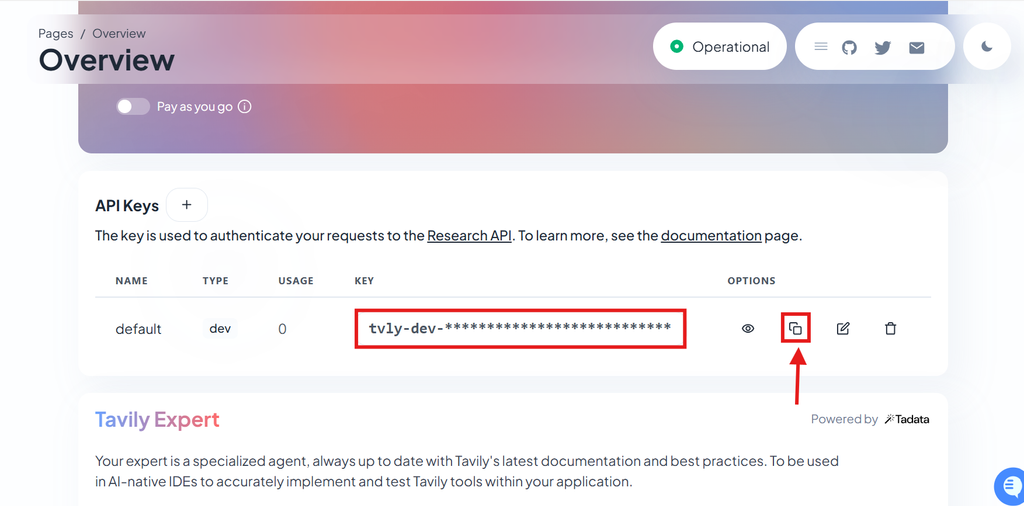
You need to copy the key from Tavily’s API website and paste the key on the line os.environ["TAVILY_API_KEY"] = "YOUR_KEY_HERE"
import warnings
warnings.filterwarnings('ignore')

from langchain_community.tools.tavily_search import TavilySearchResults
from langchain.tools import tool